YouTube Thumbnail Puller: Fast 2026 Workflow
Use a youtube thumbnail puller workflow to extract real public thumbnail variants, verify quality, and save clean files.
Direct answer
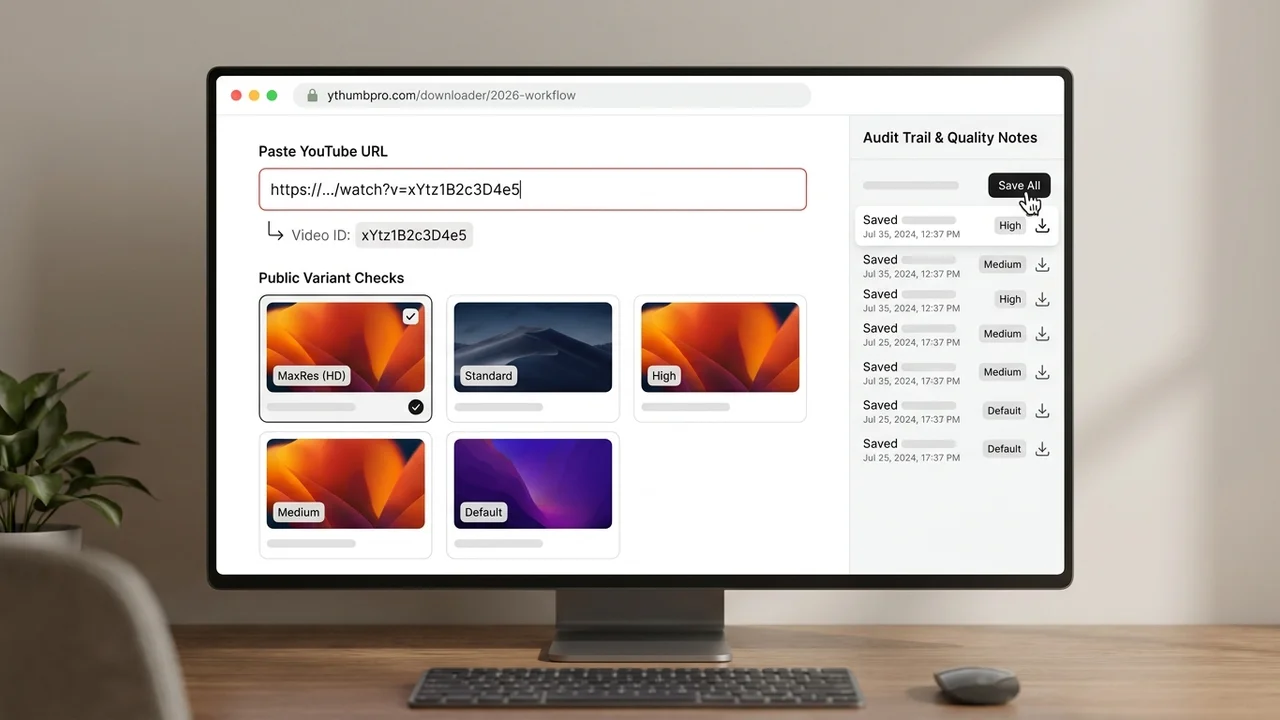
A youtube thumbnail puller should extract the video ID, check the real public thumbnail variants YouTube exposes, and save the cleanest working image without making false resolution claims. YThumbPro follows that sequence so creators can pull thumbnails for audits, briefs, and pre-publish review with a clear record of source URL, variant, and actual quality.
Key takeaways
- Start by extracting the video ID from a normal URL, Shorts URL, mobile share link, embed URL, or raw ID.
- Pull the largest working public thumbnail first, then use SD, HQ, or MQ fallbacks only when needed.
- Record variant, dimensions, and source URL so audits and client notes stay reproducible.
- Move from download to AI review only when the pulled thumbnail affects CTR, refresh planning, or publishing decisions.
Published: 2026-06-23 Last updated: 2026-06-23 Author: jackyi Reviewed by: YThumbPro editorial review
AI-assisted writing disclosure: this article was drafted with AI assistance and reviewed for accuracy, originality, and YThumbPro product fit by the YThumbPro editorial team.
A youtube thumbnail puller is useful when you need the cleanest public thumbnail from a YouTube video fast, but the quality still has to be honest. This guide shows the workflow I use in YThumbPro: extract the video ID, check real public variants, save the largest working file, document fallbacks, and decide when the image needs deeper thumbnail analysis.
A youtube thumbnail puller should extract the video ID, check the real public thumbnail variants YouTube exposes, and save the cleanest working image without making false resolution claims. YThumbPro follows that sequence so creators can pull thumbnails for audits, briefs, and pre-publish review with a clear record of source URL, variant, and actual quality.
YouTube Thumbnail Puller Workflow in 5 Steps
The fastest workflow is not just "paste and download." It is a repeatable sequence that makes the source and quality easy to verify later.
Use this process when you need a thumbnail for research, a client audit, a content calendar, or a pre-publish creative review:
- Copy a normal YouTube URL, Shorts URL, mobile share link, embed URL, or raw video ID.
- Open YThumbPro or the HD thumbnail downloader.
- Paste the link and let the tool normalize the video ID.
- Pull the largest working thumbnail variant first.
- Save the image with source URL, variant name, date, and dimensions.
This simple audit trail saves time later. If a teammate asks where the file came from, you can show the exact video, variant, and fallback behavior instead of relying on a vague downloaded filename.
YouTube Thumbnail Extractor Quality Checks
A youtube thumbnail extractor should be judged by what it verifies, not only by whether it returns an image. Some videos expose a large clean public image. Others fall back to smaller files or return placeholder behavior.
Here is the quality checklist I use before accepting a pulled thumbnail:
| Check | What to inspect | Acceptable result | Red flag |
|---|---|---|---|
| Video ID | The link resolves to one public ID | Standard 11-character ID | Playlist, channel, or malformed link only |
| Largest variant | The maximum public image loads | Clean thumbnail file appears | Broken image or placeholder |
| Fallback path | Smaller variants are checked only when needed | SD/HQ/MQ is clearly labeled | Fallback is renamed as HD |
| Real dimensions | Saved file size is recorded | Dimensions match the audit need | No size or variant record |
| Visual clarity | Subject and text survive mobile preview | Main promise is readable | Small text, blur, or weak focal point |
This is where YThumbPro differs from a generic one-click script. The goal is not to make every thumbnail sound high-resolution. The goal is to fetch the best real public file and explain what happened.
How to Fetch YouTube Thumbnail Images Reliably
To fetch YouTube thumbnail images reliably, separate ID parsing from image quality. A bad parser fails before quality even matters. A bad quality workflow accepts the first file without checking whether a larger public variant exists.
YThumbPro handles common URL forms, including standard watch URLs, shortened share URLs, mobile links, Shorts URLs, embed URLs, and raw IDs. After the ID is normalized, the tool can check public image variants in order and show a usable result without requiring a browser extension.
For repeatable work, store four details with the file:
- Video URL or video ID
- Pulled variant name
- Actual pixel dimensions
- Date the thumbnail was pulled
That small record matters for agencies and creators. You can compare thumbnails over time, rebuild a research board, or explain why an older video only produced a smaller fallback.
When a Pulled Thumbnail Needs Analysis
Pulling the image is only the first step when the thumbnail affects performance. A file can be large and still fail because the subject is unclear, the text is unreadable, or the image does not match the video title.
After saving the thumbnail, preview it at mobile size and ask five questions:
- Is the main subject obvious in under two seconds?
- Does the thumbnail promise match the title?
- Is the text readable without zooming?
- Does the subject separate from the background?
- Is there a specific click reason?
If the thumbnail affects a publishing decision, refresh plan, paid campaign, or client recommendation, use the YouTube Thumbnail Analyzer. It reviews visible readiness signals such as mobile readability, focal clarity, contrast, expectation match, and click motivation.
Where Pulling Fits in the Downloader Cluster
The puller workflow sits beside the YouTube thumbnail extractor guide, the 4K download guide, and the 1080p download guide. Each page serves a different intent.
Use this page when the job is to pull the public thumbnail quickly and keep a clean audit trail. Use the extractor guide when you want the broader technical explanation. Use the HD or 4K workflows when resolution expectations are the main question.
This separation keeps the content helpful. Someone searching for youtube thumbnail puller wants a direct process, not a generic article that mixes every downloader, analyzer, and design topic into one page.
Conclusion
A youtube thumbnail puller should extract the video ID, check the real public thumbnail variants, and save the cleanest working file with honest quality notes. Use the pulled image for research and audits, then move into AI analysis when the thumbnail affects CTR, refresh planning, or publishing decisions.
Ready to pull a thumbnail? Start with YThumbPro, use the HD downloader for common high-quality saves, or compare maximum public variants with the 4K downloader.
Frequently Asked Questions
Q: What does a YouTube thumbnail puller do?
It extracts the video ID from a YouTube link, checks the public thumbnail files for that video, and lets you save the best working image. A trustworthy puller also makes fallback quality clear.
Q: Is a YouTube thumbnail puller different from an extractor?
The terms often mean the same thing. In YThumbPro, pulling and extracting both mean finding the public thumbnail variants and saving the cleanest real file.
Q: Can I fetch YouTube thumbnail images from Shorts?
Yes, if the Shorts URL resolves to a public video ID. Paste the Shorts link into YThumbPro and it will check the same thumbnail variant pattern used by standard videos.
Q: Why does the largest thumbnail sometimes fail?
Some videos do not expose every public variant, especially older uploads, removed videos, private videos, or videos without a strong custom thumbnail source. Use the largest working fallback and record the actual size.
About the Author
jackyi is a YouTube growth and thumbnail optimization practitioner focused on practical creator workflows. YThumbPro articles are written with AI assistance, edited for originality, and reviewed against product behavior before publication.
Next action
Use this guide on a real YouTube thumbnail
Paste a video URL, download the available thumbnail sizes, then decide whether the image needs a deeper AI readiness review.
Step-by-step guide
- 1
Copy the YouTube link
Use a regular video URL, Shorts URL, mobile share link, embed URL, or raw 11-character video ID.
- 2
Paste it into YThumbPro
The puller normalizes the link and extracts the public video ID.
- 3
Check public thumbnail variants
Start with the largest public image and continue through SD, HQ, and MQ fallbacks if needed.
- 4
Save the cleanest working file
Record the variant, source URL, date, and dimensions for future audits or briefs.
- 5
Analyze when the image affects a decision
Use AI thumbnail review when the pulled image informs CTR, refresh, client, or publishing decisions.
Frequently asked questions
What does a YouTube thumbnail puller do?
It extracts the video ID from a YouTube link, checks the public thumbnail files for that video, and lets you save the best working image. A trustworthy puller also makes fallback quality clear.
Is a YouTube thumbnail puller different from an extractor?
The terms often mean the same thing. In YThumbPro, pulling and extracting both mean finding the public thumbnail variants and saving the cleanest real file.
Can I fetch YouTube thumbnail images from Shorts?
Yes, if the Shorts URL resolves to a public video ID. Paste the Shorts link into YThumbPro and it will check the same thumbnail variant pattern used by standard videos.
Why does the largest thumbnail sometimes fail?
Some videos do not expose every public variant, especially older uploads, removed videos, private videos, or videos without a strong custom thumbnail source. Use the largest working fallback and record the actual size.