YouTube Thumbnail to PNG: 2026 Conversion Workflow
YouTube thumbnail to PNG workflow for creators: save the best public image, convert safely, preserve quality, and avoid fake transparency. Start now.
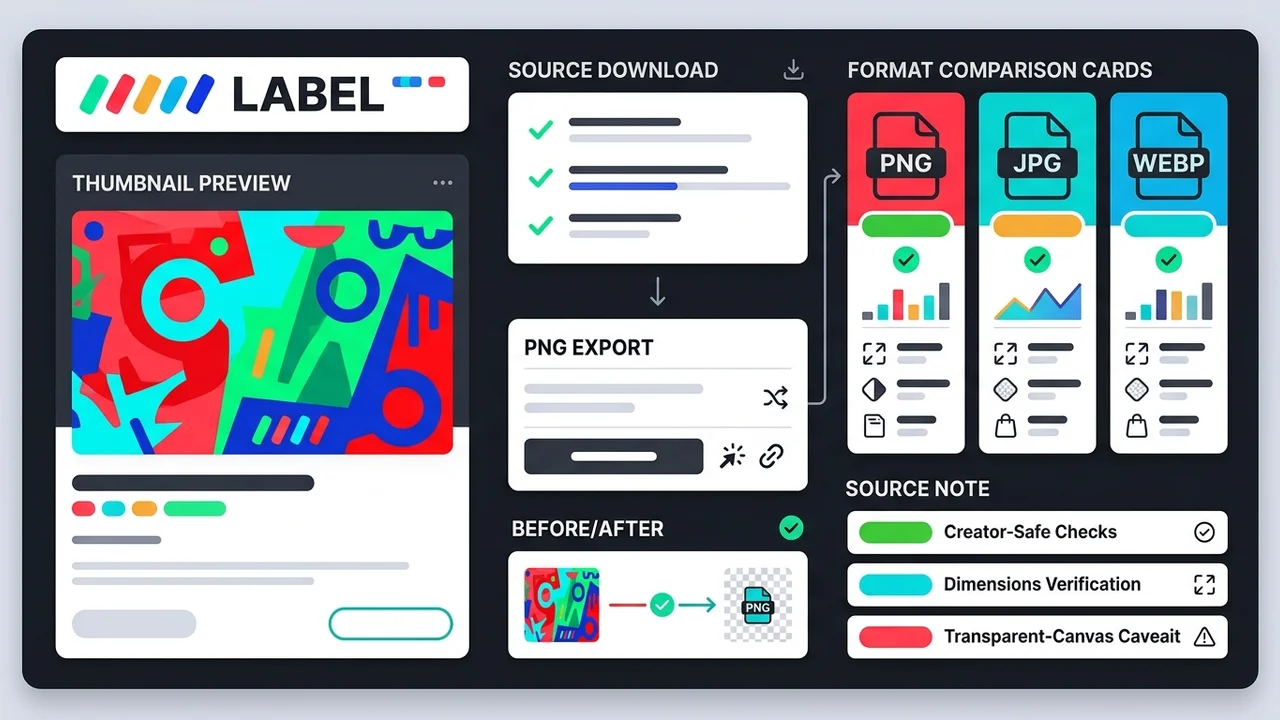
Direct answer
To convert a YouTube thumbnail to PNG, first save the largest real public thumbnail image, then convert that file to PNG only when you need lossless editing, design handoff, or a consistent archive format. PNG conversion does not create extra detail or real transparency if the source thumbnail did not include it, so keep the original URL, source format, dimensions, and conversion date beside the file.
Key takeaways
- Download the largest real public thumbnail before converting; PNG cannot restore missing detail.
- Use PNG for editing, design handoff, transparent-canvas workflows, and consistent archives.
- Keep JPG or WebP when file size, web performance, or quick sharing matters more than edit fidelity.
- Record the source URL, original dimensions, source format, and conversion date with every PNG.
Published: 2026-07-07 Last updated: 2026-07-07 Author: jackyi Reviewed by: YThumbPro editorial review
AI-assisted writing disclosure: this article was drafted with AI assistance and reviewed for accuracy, originality, and YThumbPro product fit by the YThumbPro editorial team.
youtube thumbnail to PNG searches usually mean one of three things: a creator needs an editable file, a designer wants a clean handoff format, or a team wants consistent archive images. This guide shows the workflow I use in YThumbPro projects: save the largest real public thumbnail first, convert only when PNG is the right format, verify dimensions, and keep enough source notes to trace the file later.
To convert a YouTube thumbnail to PNG, first save the largest real public thumbnail image, then convert that file to PNG only when you need lossless editing, design handoff, or a consistent archive format. PNG conversion does not create extra detail or real transparency if the source thumbnail did not include it, so keep the original URL, source format, dimensions, and conversion date beside the file.
YouTube Thumbnail to PNG Conversion Workflow
A youtube thumbnail to PNG workflow should start with source quality, not the export button. If the public thumbnail variant is small or compressed, converting it to PNG will preserve that file more cleanly for editing, but it will not restore missing pixels.
Use this workflow:
- Paste the public video URL into YThumbPro or the HD thumbnail downloader.
- Verify the largest real public thumbnail variant that loads.
- Save the source image with video ID, format, dimensions, and pull date.
- Convert the saved file to PNG for editing, handoff, or archive use.
- Keep the original download beside the PNG derivative.
That final step matters. A PNG without source context can look official even when it is only a converted fallback image.
Convert YouTube Thumbnail to Image Without Quality Myths
convert youtube thumbnail to image is a broader task than PNG export. You may need JPG for sharing, WebP for a web page, or PNG for design work. The right format depends on what happens after download.
| Format | Best use | Tradeoff |
|---|---|---|
| PNG | Editing, design handoff, transparent-canvas workflows, archives | Larger files; no automatic quality upgrade |
| JPG | Fast sharing, broad compatibility, simple reports | Lossy compression after repeated exports |
| WebP | Smaller web files and modern delivery | Some older workflows may need conversion |
For most creator audits, I keep the original file plus one working copy. If the team will annotate, crop, mask, or compare the thumbnail in a design tool, PNG is the safer working copy.
YouTube Thumbnail PNG Download Source Notes
youtube thumbnail PNG download workflows become risky when the PNG is detached from the original video. The file may be useful, but reviewers still need to know where it came from and what changed.
Record these fields before sharing the PNG:
- Public video URL or 11-character video ID
- Original thumbnail variant and source format
- Original dimensions before conversion
- PNG export dimensions
- Pull date and conversion date
- Intended use: archive, owned-channel edit, client brief, or competitor research
This is the difference between a useful creator asset and a random image folder. Source notes also prevent a converted fallback from being mistaken for a full-quality original.
When PNG Is Better Than JPG or WebP
PNG is useful when the thumbnail is going into a design process. It handles repeated editing better than JPG, supports transparency when transparency is actually created, and gives designers a predictable format for overlays, masks, and annotation.
PNG is not always the best delivery format. If you are publishing a web page, sending a quick report, or storing many examples, JPG or WebP may be smaller and easier to share. For a deeper format comparison, use PNG vs JPG vs WebP for YouTube thumbnails.
The practical rule is simple: keep PNG for work-in-progress and handoff, then export a smaller format if the image needs to load quickly online.
Safe PNG Workflows on Mobile and Desktop
On desktop, the clean workflow is to download the thumbnail, convert or export from your design tool, and verify the PNG dimensions. On mobile, use the mobile thumbnail download workflow first, then move the file into your editor or cloud folder.
Do not assume PNG means transparent. If a thumbnail has a colored background, the converted PNG keeps that background unless you remove it. Background removal is a separate edit, and it should be labeled clearly if the file is used in a client brief.
After conversion, run a visual check. Inspect text sharpness, color shifts, crop, and compression artifacts. If the PNG will support a publishing decision, upload it to the YouTube Thumbnail Analyzer and review mobile readability, contrast, focal clarity, and title-thumbnail promise match.
Responsible Use and Format Context
Use PNG conversion for your own thumbnails, creator archives, design notes, and internal research. For competitor thumbnails, treat the PNG as a reference artifact, not reusable artwork.
YouTube documents thumbnail requirements in YouTube Help, Google explains image context in Search Central image SEO best practices, and MDN documents PNG format behavior in its image type guide.
Conclusion
A youtube thumbnail to PNG workflow is useful when you need a clean editing or handoff format, but it starts with the public source thumbnail. Save the best real variant, convert honestly, verify dimensions, and keep source notes so the PNG remains trustworthy.
Ready to work with a PNG copy? Start with PNG thumbnail download, compare JPG thumbnail download, or review format choices in PNG vs JPG vs WebP YouTube thumbnails.
Frequently Asked Questions
Q: Can I convert a YouTube thumbnail to PNG?
Yes. Save the public thumbnail image first, then convert it to PNG with a browser workflow, design tool, or image converter. The conversion changes the file format, not the underlying source quality.
Q: Does youtube thumbnail PNG download improve quality?
No. PNG can preserve the quality of the downloaded file during editing, but it cannot add detail that was not present in the public thumbnail variant.
Q: Will PNG conversion make the background transparent?
Not automatically. A converted PNG keeps the same visible background unless you separately remove the background or edit the image in a design tool.
Q: Should I use PNG, JPG, or WebP for thumbnail work?
Use PNG for editing and handoff, JPG for broad compatibility, and WebP for smaller web files. Keep the original download too, especially for audits and creator archives.
About the Author
jackyi is a YouTube growth and thumbnail optimization practitioner focused on practical creator workflows. YThumbPro articles are written with AI assistance, edited for originality, and reviewed against product behavior before publication.
Next action
Use this guide on a real YouTube thumbnail
Paste a video URL, download the available thumbnail sizes, then decide whether the image needs a deeper AI readiness review.
Step-by-step guide
- 1
Save the best public thumbnail
Paste the video URL into YThumbPro, verify the largest real public variant, and avoid fake upscale labels.
- 2
Record source context
Keep the source URL, video ID, original format, dimensions, pull date, and intended use before conversion.
- 3
Convert to PNG
Use your design tool or converter to export PNG when you need lossless edits, transparent-canvas work, or archive consistency.
- 4
Check the converted file
Open the PNG, confirm dimensions, inspect sharpness, and make sure no accidental compression or background change occurred.
- 5
Keep both files when needed
Store the original thumbnail and the PNG derivative so reviewers can trace where the converted image came from.
Frequently asked questions
Can I convert a YouTube thumbnail to PNG?
Yes. Save the public thumbnail image first, then convert it to PNG with a browser workflow, design tool, or image converter. The conversion changes the file format, not the underlying source quality.
Does youtube thumbnail PNG download improve quality?
No. PNG can preserve the quality of the downloaded file during editing, but it cannot add detail that was not present in the public thumbnail variant.
Will PNG conversion make the background transparent?
Not automatically. A converted PNG keeps the same visible background unless you separately remove the background or edit the image in a design tool.
Should I use PNG, JPG, or WebP for thumbnail work?
Use PNG for editing and handoff, JPG for broad compatibility, and WebP for smaller web files. Keep the original download too, especially for audits and creator archives.