PNG vs JPG vs WebP for YouTube Thumbnails
Compare PNG, JPG, and WebP for YouTube thumbnail downloading, editing, sharing, and web preview workflows.
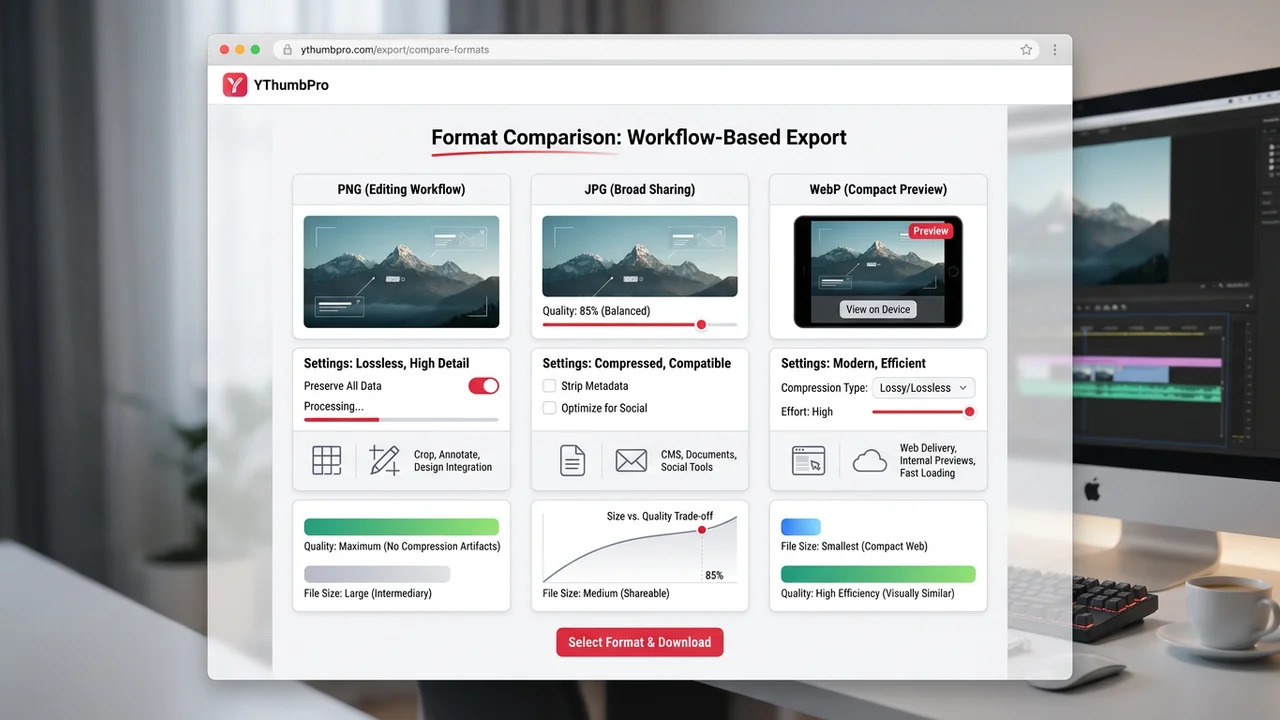
Direct answer
Use JPG when you need broad compatibility, PNG when the thumbnail will be edited or placed into a design workflow, and WebP when you need a compact modern web preview. The right format depends on what happens after download.
Key takeaways
- JPG is safest for broad sharing.
- PNG is strongest as a clean editing intermediate.
- WebP is useful for compact web delivery and previews.
Thumbnail format comparison
| Format | Best for | Watch out for |
|---|---|---|
| JPG | Publishing, sharing, slides | Lossy compression can soften text |
| PNG | Editing and design workflows | Larger files |
| WebP | Compact web previews | Older tools may not accept it |
| Source design file | Repeated revisions | Not a public YouTube thumbnail URL |
Choose the format after you know the job
Format advice is only useful when tied to a workflow. A thumbnail used in a content brief has different needs from a thumbnail headed into a design app.
YThumbPro keeps format choice close to the download action so users can select JPG, PNG, or WebP after the public variant loads.
Use PNG for editing passes
PNG is a practical choice when a thumbnail will be cropped, annotated, or placed into a design review. It avoids extra lossy compression during intermediate steps.
If final file size matters, export a JPG or WebP after editing instead of treating PNG as the only output.
Use JPG or WebP for distribution
JPG remains the safest file type for broad compatibility across CMS tools, documents, and social workflows.
WebP is useful for websites and internal previews where compact image weight matters.
Choose format by workflow, not by habit
PNG, JPG, and WebP are not simply quality labels. They are workflow choices. A creator saving a thumbnail for a quick reference folder has different needs from a designer who will annotate the image, crop it, place it into a content brief, and export it again later.
JPG is usually the most compatible format. It works across editors, documents, slide decks, social tools, and content systems. PNG is a better intermediate format when you want to avoid extra lossy compression while making edits. WebP is useful for modern web previews because it can keep file size low.
YThumbPro's format pages separate these intents so each searcher can land on the canonical page that matches the job: PNG for editing, JPG for compatibility, and WebP for compact web use.
Use JPG for sharing and broad compatibility
JPG remains the safest default when the thumbnail needs to move between common tools. It is accepted almost everywhere, usually produces a manageable file size, and is easy to attach to emails, docs, CMS entries, and presentation slides.
The tradeoff is compression. Fine text, small facial details, and high-contrast edges can soften after repeated saves. If you are only downloading once for reference, that may be acceptable. If you will edit and export several times, start with PNG or keep the original design file.
For SEO users who search for a YouTube thumbnail JPG downloader, the main promise should be speed and compatibility. They likely want to save the image and move on.
Use PNG for editing and review
PNG is often the right choice when the thumbnail becomes part of a design workflow. It is useful for annotations, audit decks, comparison boards, and editing passes where you want a clean intermediate file.
PNG files are usually larger than JPG files. That is not a problem for a one-off review, but it can matter when saving many thumbnails or building a web page. After editing, you can export a final JPG or WebP if file size matters.
For YThumbPro, the PNG landing page targets users who already know they want a clean file for a next step. That is different from a generic downloader query, so the title, description, FAQ, and internal links should stay distinct.
Use WebP for compact modern previews
WebP is useful when the thumbnail will be embedded in a modern website, internal tool, or documentation system where compact image weight matters. It can reduce file size while preserving a good visual preview.
The limitation is compatibility. Some older workflows, desktop apps, or client handoff processes still prefer JPG or PNG. If you are not sure where the file will go, JPG is usually the safer handoff format.
WebP download intent is narrower, but it is valuable because the searcher often has a specific technical need. A dedicated page can answer that need without forcing users through a generic format explanation.
Keep format choice separate from performance claims
The file format does not automatically improve CTR. A PNG thumbnail with tiny unreadable text is still a weak thumbnail. A WebP thumbnail with a clear focal point can still be useful if it is only used as a preview.
Treat format as the delivery layer and thumbnail quality as the creative layer. Quality comes from subject clarity, contrast, composition, expectation match, and whether the image makes the right viewer curious.
That is why the format guide links into the analyzer, CTR glossary, and A/B testing workflow. Searchers who start with a file-format job can continue into click-readiness work when the thumbnail matters commercially.
Format decisions for teams
Teams should agree on a default export rule so thumbnail files do not become messy. For example, use PNG for review boards, JPG for final handoff, and WebP only for web previews where every destination supports it.
Name files clearly when comparing formats. A simple pattern such as video-id-size-format keeps bulk audits readable and helps teammates avoid reviewing the wrong file. This becomes especially important when a channel manager is comparing several candidates for the same video.
If a thumbnail goes through multiple revisions, keep the editable design file outside the downloaded public thumbnail workflow. The downloaded image is a reference or output; the source design file is what should drive repeated creative edits.
How the format pages avoid duplicate intent
The PNG, JPG, and WebP landing pages share the same product capability, but they should not read like keyword-swapped duplicates. Each one needs a different angle: PNG for editing, JPG for compatibility, and WebP for compact web delivery.
This article supports all three because it compares the formats in one place and then routes users to the specific canonical page for the format they need.
That structure is safer for programmatic SEO. It adds search surface while preserving a useful reason for each page to exist.
Quality loss and repeated exports
The biggest format mistake is repeated lossy exporting. If a thumbnail is saved as JPG, edited, saved again, placed into another tool, and exported a third time, small text and edges can become visibly softer.
Use PNG or the original design file during the editing stage. Export JPG or WebP only when the destination requires a smaller or more compatible final file. This keeps the creative workflow clean without making final delivery heavier than necessary.
For downloaded public thumbnails, you cannot recover detail that is not in the source variant. Format choice can preserve or compress the file, but it cannot turn a low-quality source into a sharp original design export.
Format choices for SEO and web pages
For websites, WebP can be a strong choice because it often reduces image weight while keeping visual quality acceptable. That helps pages load quickly, especially when a blog or audit page includes many thumbnail examples.
For broad compatibility, JPG is still the safer fallback. Some workflows, email clients, older tools, or client handoffs may not handle WebP gracefully. PNG can be useful when screenshots or annotations need crisp edges.
A format guide should make these tradeoffs explicit. It should not simply rank one format as always best, because the right answer depends on destination, editing needs, and compatibility constraints.
How to turn format intent into tool starts
Users searching for PNG, JPG, or WebP downloader pages often have a file destination in mind. They are close to action, so each page should put the downloader CTA high and explain the format in plain language.
The comparison article supports those pages by helping undecided users choose. Once the user knows the format, internal links should send them to the exact canonical page rather than back to a generic list.
This flow improves conversion readiness because it reduces friction: answer the format question, provide the right tool link, and offer analysis only when the thumbnail quality decision matters.
A simple format policy for creator operations
For a solo creator, a simple policy is enough: save JPG for quick sharing, PNG for editing, and WebP for web previews. The policy prevents repeated decision fatigue and keeps thumbnail files organized across scripts, briefs, uploads, and refresh reviews.
For a team, write the policy into the creative workflow. A channel manager might request PNG for audit boards, a designer might keep the original editable file, and a marketer might publish JPG or WebP depending on the destination. Each role gets the format that matches the job.
For SEO pages, this policy becomes conversion copy. The PNG page can speak to editors, the JPG page can speak to compatibility-focused users, and the WebP page can speak to web-performance users. The comparison article ties those separate paths together without flattening the intent.
Recommended defaults for common jobs
For a quick creator audit, download the largest available thumbnail as JPG and keep the URL beside it. For a design markup session, use PNG so annotations and repeated saves do not add visible compression artifacts. For a web article that shows many examples, use WebP when the site and CMS support it.
For competitor research, consistency matters more than picking the theoretically best format. Save every example with the same format and naming pattern so the board can be scanned quickly. If a single thumbnail becomes a serious design reference, download a higher-quality or cleaner variant separately.
For publishing your own thumbnail, keep the original editable source file and export the final upload separately. The public YouTube thumbnail download is useful for review, but it should not become the master design file for future revisions.
Next action
Use this guide on a real YouTube thumbnail
Paste a video URL, download the available thumbnail sizes, then decide whether the image needs a deeper AI readiness review.
Step-by-step guide
- 1
Load the thumbnail
Paste the YouTube URL into YThumbPro.
- 2
Decide the workflow
Choose whether the file is for editing, publishing, or a web preview.
- 3
Select the format
Pick JPG, PNG, or WebP from the download controls.
- 4
Check quality
Open the file and make sure text and focal details remain readable.
Frequently asked questions
Is PNG better than JPG for thumbnails?
PNG is better for editing; JPG is usually better for broad sharing and smaller files.
Can I download YouTube thumbnails as WebP?
Yes. YThumbPro includes WebP as a format choice after loading variants.
Which format should I analyze?
Analyze the visible thumbnail candidate, then choose a download format based on your workflow.