Free YouTube Thumbnail Downloader: No Watermark Guide
Use a free YouTube thumbnail downloader with no watermark, no login, and clear HD fallbacks. Learn the safest creator workflow.
Direct answer
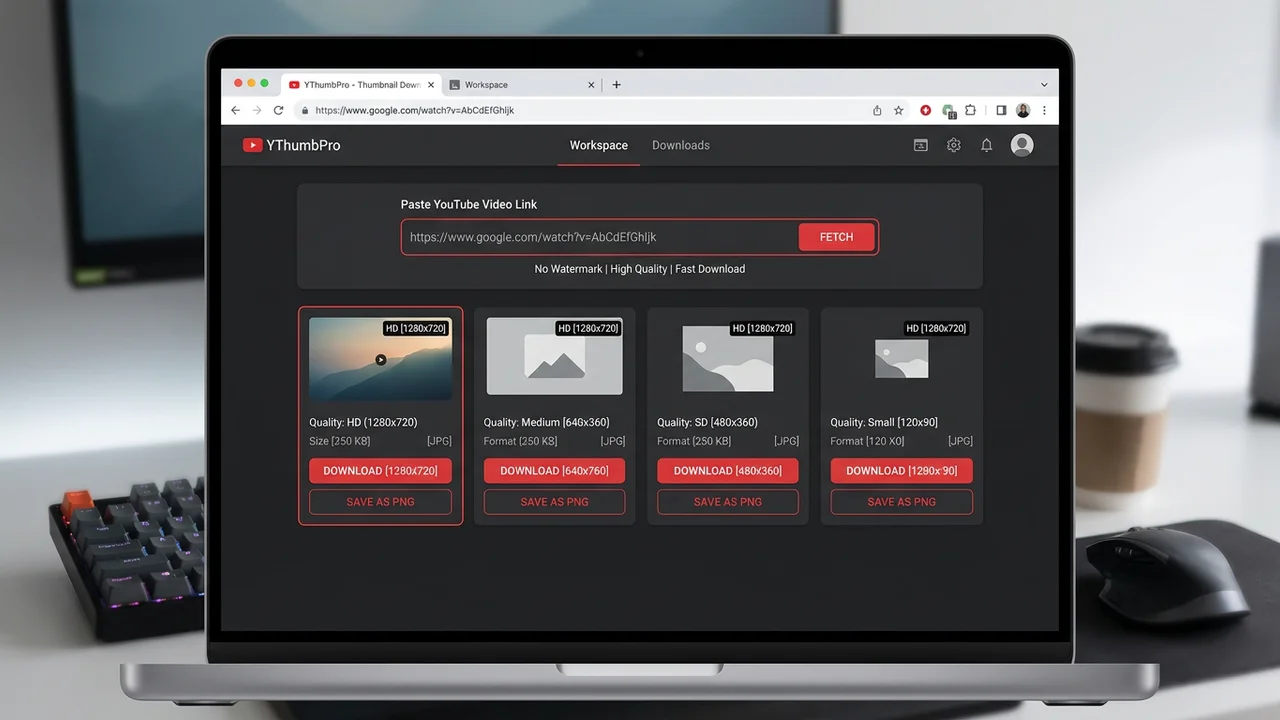
A free YouTube thumbnail downloader should let you paste a public video URL, preview the available thumbnail sizes, and save the clean image without adding a watermark or forcing an account. YThumbPro keeps that first download workflow free, then offers AI analysis when the thumbnail decision affects CTR or a publishing workflow.
Key takeaways
- Use the largest public thumbnail YouTube exposes, then fall back honestly when HD is unavailable.
- No-watermark downloading is useful for research and creator audits, not for copying another channel's artwork.
- Move from free download to AI review when the thumbnail affects a live publishing or refresh decision.
Published: 2026-06-18 Last updated: 2026-06-18 Author: jackyi Reviewed by: YThumbPro editorial review
AI-assisted writing disclosure: this article was drafted with AI assistance and reviewed for accuracy, originality, and YThumbPro product fit by the YThumbPro editorial team.
free youtube thumbnail downloader searches usually come from one simple need: you want the clean thumbnail image quickly, without a watermark, without registration, and without guessing which YouTube image URL works. This guide shows the exact no-watermark workflow, when HD is available, how to handle fallbacks, and when to move from free download into AI thumbnail review.
A free YouTube thumbnail downloader should let you paste a public video URL, preview the available thumbnail sizes, and save the clean image without adding a watermark or forcing an account. YThumbPro keeps that first download workflow free, then offers AI analysis when the thumbnail decision affects CTR or a publishing workflow.
Free YouTube Thumbnail Downloader: What "No Watermark" Means
A no-watermark downloader should not add a tool logo, badge, frame, or promotional overlay to the image you save. The file should reflect the public thumbnail variant that YouTube exposes for that video.
That does not mean the thumbnail becomes royalty-free. If the thumbnail belongs to another channel, treat it as a reference for research, reporting, or a creative audit. Do not copy the artwork into your own upload.
YThumbPro keeps the first download step clean because that is the user's job. Paste a public URL, check the available variants, and save the image. The deeper product value comes later, when a creator wants to understand whether a thumbnail is readable, focused, and aligned with the title.
Download YouTube Thumbnail Without Login in 5 Steps
Use this workflow when you want a clean public thumbnail for your own channel audit, a client brief, or competitor research:
- Copy the public YouTube video URL, Shorts URL, mobile share link, or 11-character video ID.
- Open YThumbPro or the HD YouTube thumbnail downloader.
- Paste the URL and let the downloader detect the video ID.
- Choose the largest working public thumbnail variant.
- Save the image and record the source URL if it will be used in a research board.
The no-login flow is intentionally lightweight. If a video is private, deleted, age-restricted, or missing a usable public image variant, the downloader should explain that limit instead of hiding it behind a fake "premium" result.
Free Online Thumbnail Quality: HD, Fallbacks, and Limits
Many users expect every free YouTube thumbnail downloader to return HD. In reality, YouTube may expose several public variants, and not every video has the same largest available image.
| Variant | Typical role | Best use |
|---|---|---|
| maxresdefault | Largest common 16:9 public image | Creator audits, redesign briefs, and article visuals |
| sddefault | Useful fallback when HD is missing | Quick comparison or source confirmation |
| hqdefault | Smaller preview image | Research boards where exact detail is less important |
| mqdefault | Mobile-sized preview | Fast visual checks and lightweight references |
Do not upscale a fallback image and call it HD. Upscaling can make dimensions larger, but it cannot restore detail that the public source did not provide.
When a Free Downloader Is Enough
A free downloader is enough when your job is to save a public thumbnail, check a source image, build a research board, or compare your own previous uploads. In those cases, speed and clarity matter more than advanced scoring.
It is also enough when you are collecting examples for an original brief. For example, you might save five thumbnails from similar videos, tag text length and color patterns, then design your own candidate from scratch.
The important rule is context. Keep the video URL, title, topic, and date beside the saved image. A thumbnail without context is just a picture; a thumbnail with context becomes useful evidence.
YouTube Thumbnail Download Free Online vs AI Review
Use AI review when the thumbnail affects a publishing decision, a refresh decision, or a client recommendation. The YouTube Thumbnail Analyzer can help check visible readiness signals before you publish.
For YThumbPro, the useful questions are practical:
- Can viewers understand the subject at mobile size?
- Does the thumbnail promise match the title?
- Is the focal point clear?
- Is contrast strong enough for a fast feed scan?
- Is there a specific reason to click?
AI analysis should not promise exact CTR. Real click-through rate depends on the topic, title, audience, traffic source, timing, and competing videos. Treat the score as a readiness review, then validate important decisions with YouTube Analytics.
No-Watermark Downloading and Creator Rights
No watermark means the downloader does not alter the file with its own branding. It does not remove the original creator's ownership or usage rights.
For your own channel, download your public thumbnails to review how they appear after upload. For competitor research, study visible patterns such as crop, text count, contrast, proof elements, and expectation match. Then create original assets for your own video.
This is also why YThumbPro links downloader workflows to education pages like the thumbnail size FAQ and CTR readiness guide. The goal is to help creators make better decisions, not clone what already exists.
Conclusion
A free youtube thumbnail downloader should give you a clean image quickly, show honest HD fallbacks, and avoid adding a tool watermark. Start with the free no-login workflow, save the largest available thumbnail, and move into AI analysis only when the image affects a real creator decision.
Ready to test it? Try the free YouTube thumbnail downloader and then use the thumbnail analyzer when you need a publishing-ready review.
Frequently Asked Questions
Q: Can I use a free YouTube thumbnail downloader without a watermark?
Yes. A downloader can save the public thumbnail image without adding its own watermark. You still need to respect the original creator's rights if the image is not yours.
Q: Do I need to log in to download a YouTube thumbnail?
No. The basic YThumbPro download workflow works from a public video URL without login. Sign in only when you want saved history, AI analysis, or repeat optimization workflows.
Q: What is the best free thumbnail size to download?
Start with maxresdefault when YouTube exposes it because it is usually the clearest common 16:9 public image. If it is missing, use the next available fallback size and note the limitation.
Q: Is downloading another channel's thumbnail legal?
Downloading for reference, research, or audit use is different from reusing the image. Do not copy another creator's face, artwork, branding, or protected assets in your own thumbnail.
About the Author
jackyi is a YouTube growth and thumbnail optimization practitioner focused on practical creator workflows. YThumbPro articles are written with AI assistance, edited for originality, and reviewed against product behavior before publication.
Next action
Use this guide on a real YouTube thumbnail
Paste a video URL, download the available thumbnail sizes, then decide whether the image needs a deeper AI readiness review.
Step-by-step guide
- 1
Copy the public YouTube URL
Use the browser address, share link, Shorts link, or raw video ID from a public video.
- 2
Paste it into YThumbPro
The downloader extracts the video ID and checks the available public thumbnail variants.
- 3
Choose the cleanest available image
Download the largest working version first, and use fallbacks only when HD is missing.
- 4
Review the thumbnail before reuse
Check mobile readability, subject clarity, and rights before putting the image into a brief or redesign.
- 5
Run AI analysis when performance matters
Use YThumbPro analysis when the thumbnail affects CTR, refresh decisions, or client work.
Frequently asked questions
Can I use a free YouTube thumbnail downloader without a watermark?
Yes. A downloader can save the public thumbnail image without adding its own watermark. You still need to respect the original creator's rights if the image is not yours.
Do I need to log in to download a YouTube thumbnail?
No. The basic YThumbPro download workflow works from a public video URL without login. Sign in only when you want saved history, AI analysis, or repeat optimization workflows.
What is the best free thumbnail size to download?
Start with maxresdefault when YouTube exposes it because it is usually the clearest common 16:9 public image. If it is missing, use the next available fallback size and note the limitation.
Is downloading another channel's thumbnail legal?
Downloading for reference, research, or audit use is different from reusing the image. Do not copy another creator's face, artwork, branding, or protected assets in your own thumbnail.