Download YouTube Thumbnail on Mac: 2026 Save Guide
Download YouTube thumbnail files on Mac with a no-login workflow, honest HD fallbacks, Safari save tips, and creator audit notes. Try it now.
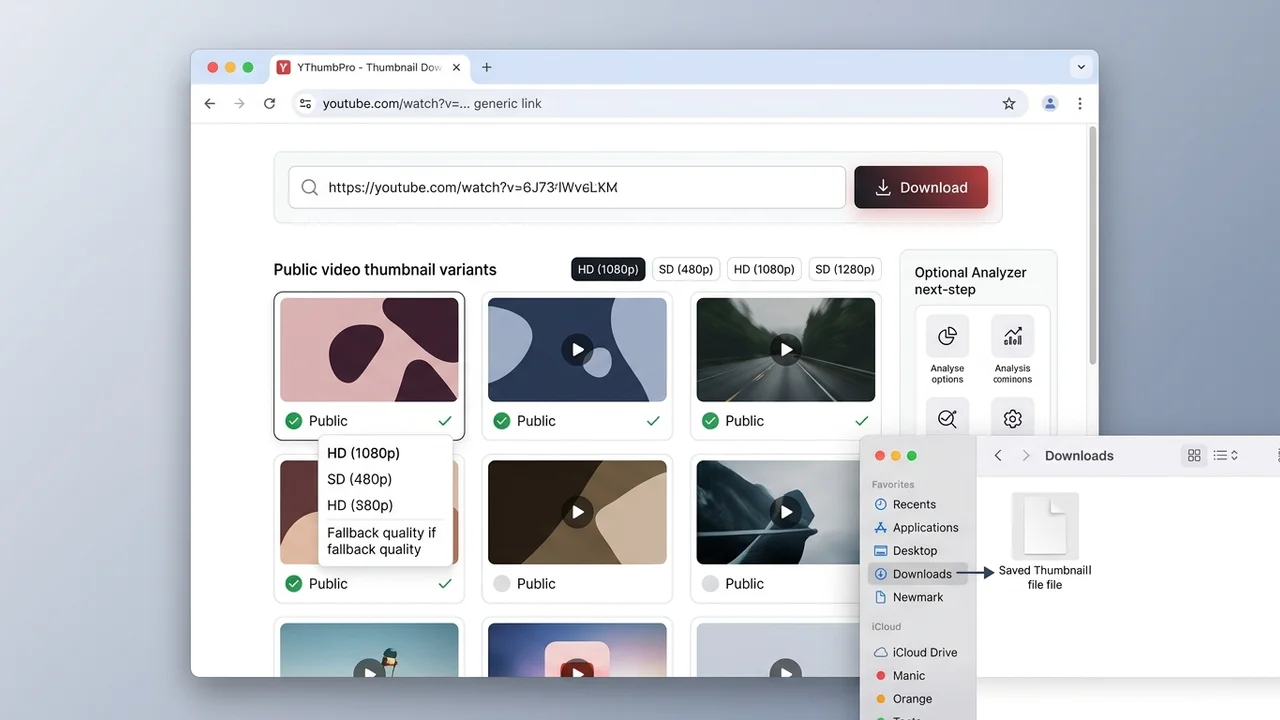
Direct answer
To download YouTube thumbnail files on Mac, copy the public video URL, paste it into a browser-based downloader, check the largest available public variant, then save the image with source context. YThumbPro works in Safari, Chrome, and Edge, so Mac users can save thumbnails without installing an app or browser extension.
Key takeaways
- Mac users do not need a desktop app to save public YouTube thumbnail files.
- Use a browser downloader first, then verify whether the largest public variant actually loads.
- Keep source URL, saved variant, dimensions, and pull date when the image supports research or a client brief.
- Use AI analysis only when the saved thumbnail affects CTR, refresh planning, or a publishing decision.
Published: 2026-06-27 Last updated: 2026-06-27 Author: jackyi Reviewed by: YThumbPro editorial review
AI-assisted writing disclosure: this article was drafted with AI assistance and reviewed for accuracy, originality, and YThumbPro product fit by the YThumbPro editorial team.
download youtube thumbnail searches from Mac users usually come from a simple workflow problem: you want the clean image file, but you do not want a sketchy extension, a desktop app, or a screenshot that captures browser scaling. This guide shows the Mac-safe workflow I use in YThumbPro: paste the URL, verify the largest public variant, save the clean file, and keep enough context for creator research.
To download YouTube thumbnail files on Mac, copy the public video URL, paste it into a browser-based downloader, check the largest available public variant, then save the image with source context. YThumbPro works in Safari, Chrome, and Edge, so Mac users can save thumbnails without installing an app or browser extension.
Download YouTube Thumbnail on Mac in 5 Steps
The Mac workflow should stay browser-first. A dedicated desktop app is unnecessary for most creator research, and screenshots are a weak substitute when you need the original public thumbnail file.
Use this process in Safari, Chrome, or Edge:
- Copy a standard YouTube URL, Shorts URL, mobile share link, embed URL, or raw video ID.
- Open YThumbPro or the HD thumbnail downloader.
- Paste the link and let the tool normalize the video ID.
- Save the largest working public thumbnail variant.
- Rename the file or note the source URL when the image supports an audit.
That last step is the information-gain layer most one-click guides skip. A Mac Downloads folder fills up fast, so a file named with the video topic, variant, and pull date is easier to trust later.
YouTube Thumbnail Downloader Options on Mac
A youtube thumbnail downloader for Mac should work in the browser, accept normal YouTube links, and label fallback sizes honestly. It should not require a Safari extension just to check a public thumbnail image.
| Mac option | Best use | Watch out for |
|---|---|---|
| Browser downloader | Fast public thumbnail saves | Verify the actual variant before calling it HD |
| Screenshot shortcut | Documenting how a page looked on screen | Captures scaling, browser UI, and compression |
| Design tool export | Your own channel assets | Only works when you have the original design file |
| AI analyzer after download | Publishing or refresh decisions | Use as readiness review, not exact CTR prediction |
For most creator workflows, start with the browser downloader. Use screenshots only when you need to document search layout, channel layout, or how the thumbnail appeared in a specific surface.
Save YouTube Thumbnail Files Cleanly in Safari or Chrome
To save YouTube thumbnail files cleanly, separate file extraction from file organization. The extraction job is to find the largest real public image. The organization job is to keep the saved file useful after it leaves the browser.
I use a simple Mac naming pattern for client and creator research:
- Channel or project name
- Short video topic
- Variant such as maxresdefault, sddefault, or hqdefault
- Pull date in YYYY-MM-DD format
For example, a research file might become fitness-title-test-maxresdefault-2026-06-27.webp. That is more useful than a generic download name because it preserves what the file is, where it came from, and when it was checked.
If you only need a quick visual reference, a short name is fine. If the thumbnail will support a creative brief, competitor board, or refresh recommendation, keep the source URL in your notes too.
Mac Thumbnail Quality Checks: HD, Fallbacks, and Screenshots
The most common Mac mistake is using a screenshot when the real goal is to download a source thumbnail. A screenshot may be useful for documenting the page experience, but it is not the same as saving the public image variant.
Check quality in this order:
- Does the public video ID resolve correctly?
- Does the largest thumbnail variant load?
- Are smaller fallbacks labeled clearly?
- Does the saved image remain readable at mobile size?
- Is the file good enough for the task, or only a reference?
Do not upscale a fallback and call it HD. A resized file may be larger, but it will not recover text edges, face detail, or compression information missing from the source.
When a Mac Download Needs AI Review
A clean download is only the first step when the thumbnail affects performance. A large image can still fail because the subject is unclear, text is too small, contrast is weak, or the thumbnail promise does not match the video title.
After saving the thumbnail, preview it at a small size and ask:
- Can the subject be understood in under two seconds?
- Does the image match the title promise?
- Is the main text readable without zooming?
- Does the focal point stand out from the background?
- Would a competing thumbnail feel clearer beside it?
If the thumbnail affects a publishing decision, use the YouTube Thumbnail Analyzer. If your main question is resolution, compare this workflow with the 4K thumbnail download guide and the thumbnail size FAQ.
Conclusion
A download youtube thumbnail workflow on Mac should be browser-first, no-login, and honest about available quality. Use YThumbPro to save the largest public variant, keep source context for research, and move into AI analysis only when the image affects a real creator decision.
Ready to test a link? Start with YThumbPro, use the HD downloader, or review the saved image with the YouTube Thumbnail Analyzer.
Frequently Asked Questions
Q: Can I download a YouTube thumbnail on Mac without installing software?
Yes. Use YThumbPro in Safari, Chrome, or Edge, paste the public video URL, and save the best available thumbnail variant from the browser.
Q: Where does a saved YouTube thumbnail go on Mac?
Most browsers save downloaded images to the Downloads folder unless you changed the browser preference. Rename the file with the video title or source ID if it will be used in research.
Q: Is a Mac screenshot the same as a downloaded thumbnail?
No. A screenshot captures the scaled page view, browser compression, and screen size. A downloader checks the public thumbnail image file exposed for the video ID.
Q: Can I save YouTube thumbnail images in HD on Mac?
Often yes, but HD is not guaranteed for every video. Start with the largest public variant and record the fallback when only smaller files are available.
About the Author
jackyi is a YouTube growth and thumbnail optimization practitioner focused on practical creator workflows. YThumbPro articles are written with AI assistance, edited for originality, and reviewed against product behavior before publication.
Next action
Use this guide on a real YouTube thumbnail
Paste a video URL, download the available thumbnail sizes, then decide whether the image needs a deeper AI readiness review.
Step-by-step guide
- 1
Copy the YouTube URL
Use the browser address bar, share link, Shorts URL, mobile link, embed URL, or raw 11-character video ID.
- 2
Open YThumbPro on Mac
Use Safari, Chrome, or Edge and open the public downloader workflow.
- 3
Paste and check variants
Let the downloader normalize the video ID and test the largest public thumbnail variant first.
- 4
Save the best file
Download the cleanest available image and keep the source URL, variant, dimensions, and pull date.
- 5
Review when performance matters
Run AI thumbnail analysis when the saved file influences a refresh, client audit, or publishing decision.
Frequently asked questions
Can I download a YouTube thumbnail on Mac without installing software?
Yes. Use YThumbPro in Safari, Chrome, or Edge, paste the public video URL, and save the best available thumbnail variant from the browser.
Where does a saved YouTube thumbnail go on Mac?
Most browsers save downloaded images to the Downloads folder unless you changed the browser preference. Rename the file with the video title or source ID if it will be used in research.
Is a Mac screenshot the same as a downloaded thumbnail?
No. A screenshot captures the scaled page view, browser compression, and screen size. A downloader checks the public thumbnail image file exposed for the video ID.
Can I save YouTube thumbnail images in HD on Mac?
Often yes, but HD is not guaranteed for every video. Start with the largest public variant and record the fallback when only smaller files are available.