YouTube Thumbnail Analyzer: How It Works
Understand how YThumbPro reviews thumbnail CTR readiness, what AI feedback can and cannot claim, and how to use suggestions before publishing.
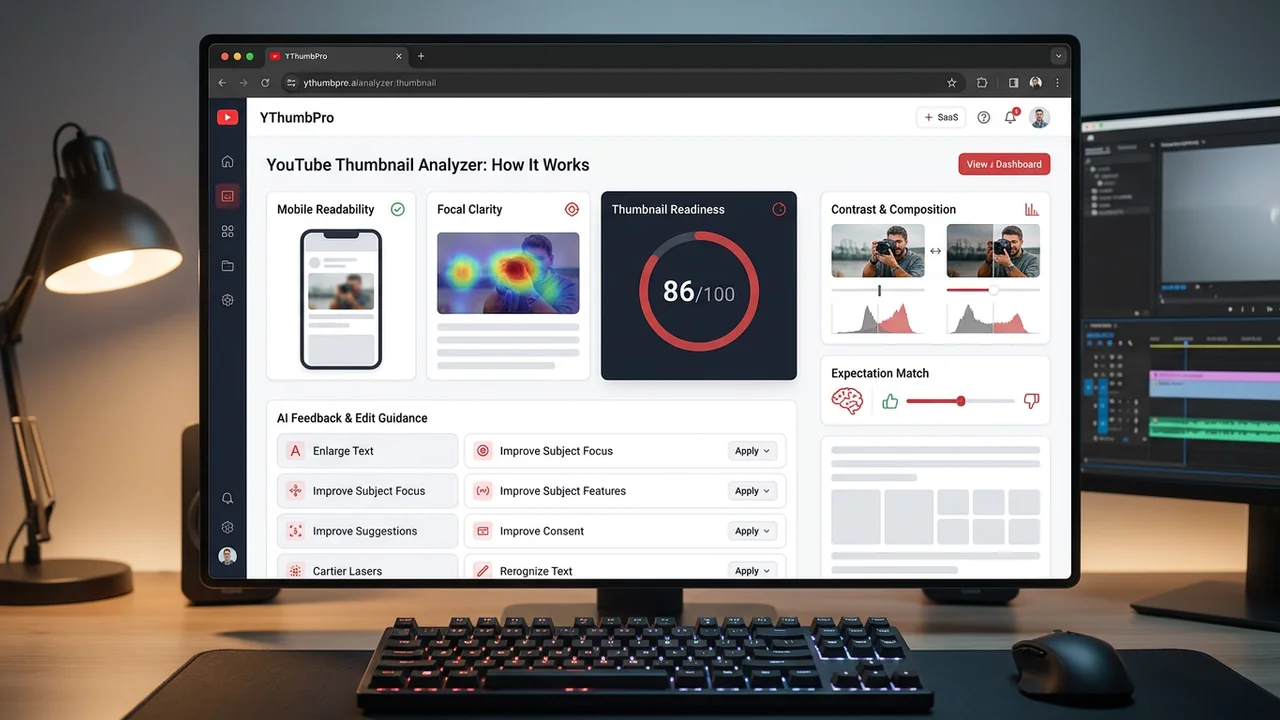
Direct answer
A YouTube thumbnail analyzer reviews visible signals such as mobile readability, focal clarity, contrast, expectation match, and click motivation. YThumbPro uses that review to provide directional improvement suggestions, not a guaranteed CTR prediction.
Key takeaways
- AI analysis is a pre-publish review layer.
- The strongest output is concrete edit guidance.
- Real CTR must still be measured in YouTube performance data.
Analyzer output and how to use it
| Output | Use it for | Do not use it for |
|---|---|---|
| Score | Prioritizing revisions | Predicting exact CTR |
| Dimension notes | Finding the weak visual area | Replacing human context |
| Suggestions | Creating the next edit pass | Copying another creator |
| History | Comparing candidates over time | Ignoring live performance data |
What the analyzer checks
The review focuses on visible factors a creator can change: subject clarity, text readability, contrast, composition, expectation match, and emotional or curiosity cues.
These signals are useful because they affect how quickly a viewer understands the thumbnail in a crowded feed.
Why the score is directional
CTR depends on the title, audience, topic, recommendation context, and timing. A thumbnail score cannot isolate all of that.
Treat the score as a readiness check that helps choose what to improve before the video gets real impressions.
How to turn feedback into edits
Start with the highest-impact suggestion. Usually that means larger text, a clearer focal point, stronger contrast, or better alignment with the title promise.
After editing, analyze the revised candidate and compare the reasoning, not only the total score.
What a thumbnail analyzer can evaluate
A YouTube thumbnail analyzer can evaluate visible signals that affect how quickly a viewer understands an image. Those signals include mobile readability, focal clarity, contrast, composition, expectation match, and click motivation.
These are practical, editable factors. A creator can enlarge text, crop the subject more clearly, simplify the background, increase contrast, or adjust the image so it matches the title promise. That is why analysis is useful before publishing.
The analyzer should not claim to know exact viewer behavior. CTR depends on topic demand, title, audience, recommendation context, traffic source, and timing. The best AI output is a readiness review, not a guaranteed forecast.
How YThumbPro frames the score
YThumbPro frames scoring as directional thumbnail readiness. A high score means the visible image appears clearer and more actionable across the scoring dimensions. It does not mean the video will achieve a specific CTR.
The methodology page explains the review factors so users can understand the score. This matters for GEO because AI answer systems need extractable statements that are consistent with visible page content and schema.
A transparent score is more useful than a dramatic promise. Serious creators want to know what to improve, what the tool cannot know, and how the output should be checked against YouTube Analytics after publishing.
Turn analysis into a revision plan
Start with the weakest visible signal. If text is unreadable, fix text before debating color. If the focal point is unclear, simplify the crop before adding more graphic elements. If the image does not match the title, clarify the promise before chasing contrast.
After one revision, run the analysis again and compare the reasoning. Do not optimize only for the total score. A slightly lower score with a more honest title-thumbnail match may be better than a higher score that attracts the wrong viewer.
The A/B testing page extends this workflow by helping users compare two candidates before a live audience test. That internal link gives commercial-intent users a next step without pretending AI replaces real experiments.
Use analysis before and after publishing
Before publishing, analysis is a pre-flight check. It helps catch obvious readability, clarity, and promise problems while the thumbnail is still cheap to edit. This is especially useful for small channels that cannot afford to test many weak candidates live.
After publishing, analysis becomes one input in a refresh decision. Compare the tool's notes with impressions, CTR, retention, traffic source, and audience context. A low CTR might come from a weak thumbnail, but it might also come from a weak topic or mismatched title.
YThumbPro's analyzer landing page targets users who are ready for this deeper workflow. The support article reinforces the page by explaining what the tool does, what it avoids claiming, and how to use the output responsibly.
Keep AI feedback grounded in visible evidence
Good AI thumbnail feedback should mention visible evidence. For example, it can say the face crop is too small, the text has too many words, the background competes with the subject, or the image promise is unclear.
Weak feedback sounds impressive but cannot be acted on. Generic statements such as make it more engaging or add emotion do not help unless they are tied to a specific visible change.
This is why YThumbPro's public content includes methodology, editorial policy, FAQ, tables, and step lists. The site is being structured for both human readers and AI systems that need clear, quoteable explanations.
What the analyzer should not claim
A thumbnail analyzer should not claim that it can know the exact CTR before the thumbnail receives impressions. It should also avoid invented benchmarks such as guaranteed percentage lifts, universal good CTR ranges, or fake ratings that are not visible in the product.
The honest claim is still valuable: the tool can evaluate visible readiness and suggest edits that are likely worth testing. This is enough to help creators save time before publishing.
Keeping this boundary clear protects trust. Users are more likely to rely on the analysis when the page explains what the tool sees, what it cannot know, and how to validate the advice with real performance data.
How the analyzer article supports signup
The free downloader can satisfy a broad transactional search. The analyzer article addresses a more commercial question: whether YThumbPro can help improve a thumbnail before it affects views.
That makes the CTA different. The user should be invited to sign in when they want analysis history, repeated reviews, comparison workflows, or paid plan capacity. The article should not block the simple download job.
By linking to the methodology page, CTR glossary, A/B test tool, and pricing page through related resources, the article turns curiosity into a deeper product path.
Signals the analyzer can describe clearly
The analyzer is strongest when it describes signals the user can see. Mobile readability means whether text and subject survive small preview sizes. Focal clarity means whether one element clearly receives attention first. Contrast means whether the subject separates from the background.
Expectation match asks whether the image supports the likely title and topic promise. Click motivation asks whether the thumbnail gives the right viewer a reason to choose this video instead of nearby alternatives.
These signals are not magic. They are practical review categories that a creator, editor, or channel manager can discuss and improve. Clear categories make the product easier to trust.
How to read suggestions without overreacting
Do not treat every suggestion as a command. Some thumbnail choices are intentional brand decisions, niche conventions, or title-dependent tradeoffs. The best use of AI feedback is to identify the risk, then decide whether it applies to the video.
If the analyzer flags small text, test the thumbnail at mobile size. If it flags weak expectation match, compare the image directly with the title. If it flags focal confusion, ask a person where their eye goes first.
This keeps the workflow grounded. AI speeds up review, but creator judgment and real performance data still matter.
Why methodology pages help analyzer rankings
Analyzer landing pages can sound vague if they only say AI scoring. The methodology page gives substance by explaining what is scored, why it matters, and what the score cannot prove.
For GEO, this matters because AI search systems prefer extractable, reviewable claims. A methodology page linked from the analyzer article and landing page creates a trust chain that supports citations and summaries.
For conversion, it also helps serious users. They can see that the product is not claiming impossible certainty, which makes the paid analysis workflow feel more credible.
A reviewer workflow for analyzer output
A useful reviewer workflow starts by reading the direct score, then the dimension notes, then the specific suggestions. The score tells the user where to focus attention; the notes explain why; the suggestions turn the review into an edit plan.
For a team, assign each suggestion to a visible edit. Mobile readability might become larger text. Focal clarity might become a tighter crop. Expectation match might become a different image moment or a title adjustment. This makes analysis operational instead of abstract.
After the edit, compare the new candidate against the original. If the revised version is clearer but less honest, keep working. If it is clearer, more focused, and still aligned with the title, it is a stronger candidate for publishing or A/B pre-testing.
Why analyzer content needs visible trust signals
AI analysis pages can easily sound like black boxes. Visible trust signals reduce that risk: author and reviewer information, updated dates, methodology links, sources, FAQs, and plain-language limits around CTR prediction.
These signals also help AI search summarize the page accurately. If the visible content says the score is directional and the schema matches that content, the page is less likely to be represented as a guaranteed CTR predictor.
That trust layer supports conversion. Serious creators and channel teams are more willing to create an account when the product explains its limits as clearly as its benefits.
A practical example of acting on feedback
If the analyzer says mobile readability is weak, the next edit might be reducing six words to three, increasing type size, or removing a background detail behind the text. If focal clarity is weak, the edit might be a tighter crop or a stronger subject-background separation.
If expectation match is weak, the creator should compare the thumbnail against the title and video payoff. The right fix might be a different frame, a more accurate prop, or a less exaggerated emotional cue.
This turns AI feedback into a concrete revision list. The user can make the edit, analyze again, and decide whether the thumbnail is ready for publishing or should move into an A/B pre-test workflow.
Next action
Turn this research into a repeatable thumbnail workflow
When thumbnail review becomes part of your publishing routine, compare the plan that matches saved history, repeated analysis, and testing needs.
Step-by-step guide
- 1
Load a thumbnail
Paste a URL or start from a downloaded candidate.
- 2
Run analysis
Sign in and request AI readiness feedback.
- 3
Read the dimensions
Focus on the weakest visual signal, not only the total score.
- 4
Revise and compare
Edit the thumbnail and analyze the new candidate.
Frequently asked questions
Can a thumbnail analyzer predict exact CTR?
No. It can provide readiness feedback, but exact CTR depends on real viewer behavior and distribution context.
What images should I analyze?
Analyze the thumbnail candidate viewers are most likely to see, usually the largest clear variant or your custom design export.
Should I use analysis before or after publishing?
Use it before publishing for edits and after publishing as one input when deciding whether to refresh a thumbnail.